
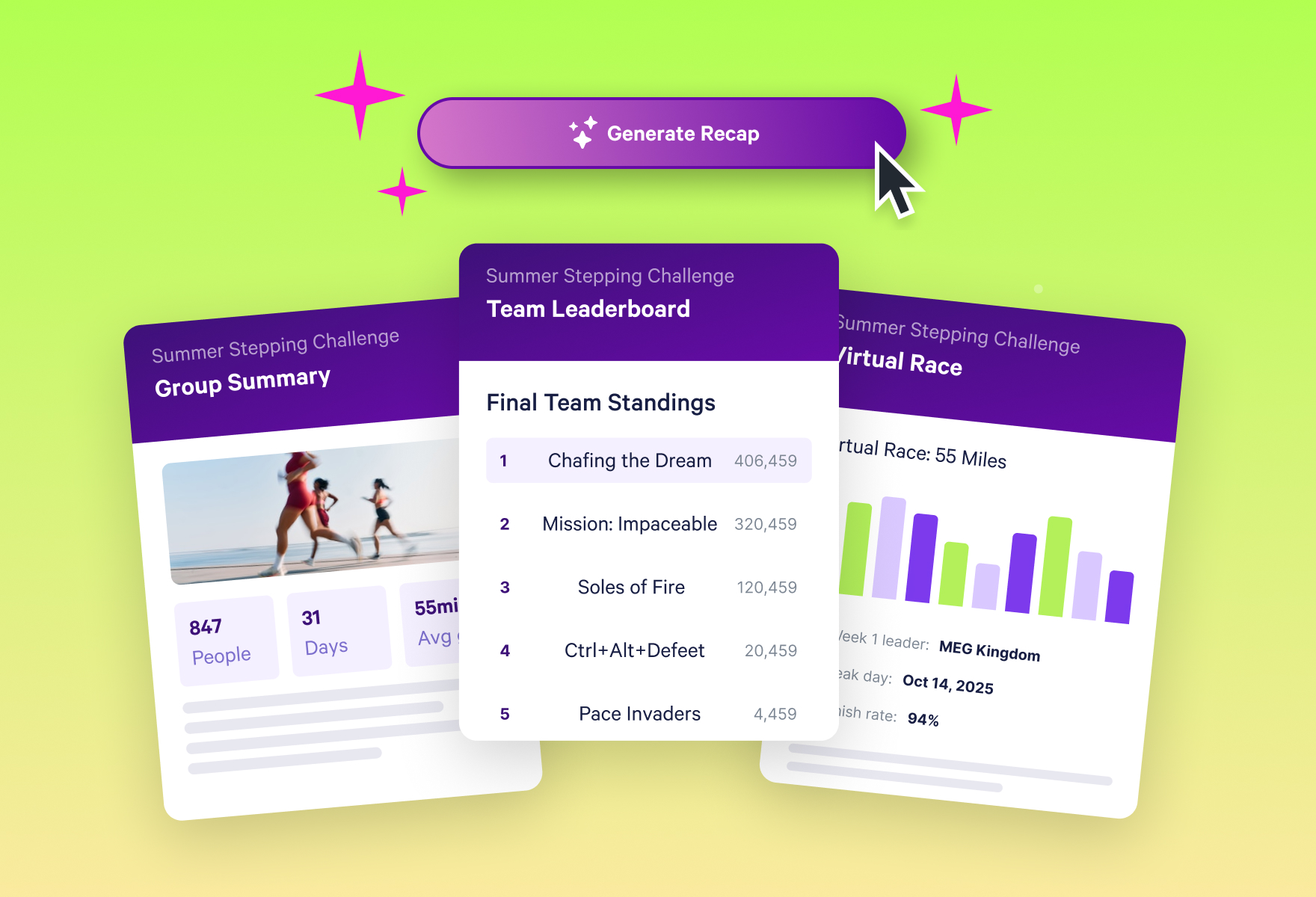
How to Create a Wellness Challenge Wrap-Up Report in Seconds
Introducing Stridekick Challenge Recap: turn any challenge into a polished, ready-to-share story, with recognition that reaches far past the top of the leaderboard.
The challenge ended Friday.
It's Monday. Somewhere in your downloads folder is a data export, and somewhere on your to-do list is "send challenge recap." It's been there since Friday. It will be there Wednesday.
So eventually you do what every busy admin does. You sort by total steps, grab the top three names, and send the email: "Congrats to our top steppers! Thanks everyone for participating!"
Three people feel great.
But the other 97 did something worth celebrating too. The person who never missed a day. The one who doubled their activity by week six. The team that synced every single morning.
Imagine if every one of them saw their win in that email. That's the recap that brings people back for the next challenge.
The recap is where your next challenge is won or lost
We've run challenges with groups of every size for over a decade, and one pattern shows up again and again: the way a challenge ends decides who shows up for the next one.
We've written before about why rewarding only the top finishers backfires. The recap is the same problem with a bigger audience. It's the one message everyone reads, and it tells your group what "success" means here.
Most recaps crown the same three winners: top stepper, top mover, most distance. Those folks will be back next time no matter what. But think about the coworker who took a walk every lunch break, or the new parent who squeezed in steps between daycare pickups. When they see themselves in the recap, they sign up again. When they don't, they might decide the next challenge isn't for them.
The fix is simple. Recognize more people across the activity spectrum, for a wider variety of wins. The hard part is finding those wins in a spreadsheet at 4:45 on a Monday.
Introducing Challenge Recap
Every win, every close race, every person who showed up. Ready to share.
Challenge Recap reads your challenge data and writes the story for you: a polished recap of your challenge, written in seconds. No spreadsheets. No slide formatting. No staring at a blank email.
You get a designed, branded recap with charts for every challenge mode, a narrative written about your group, and named recognition that reaches far past the top of the leaderboard. Send it to participants, drop it in Slack, or forward it to your boss.
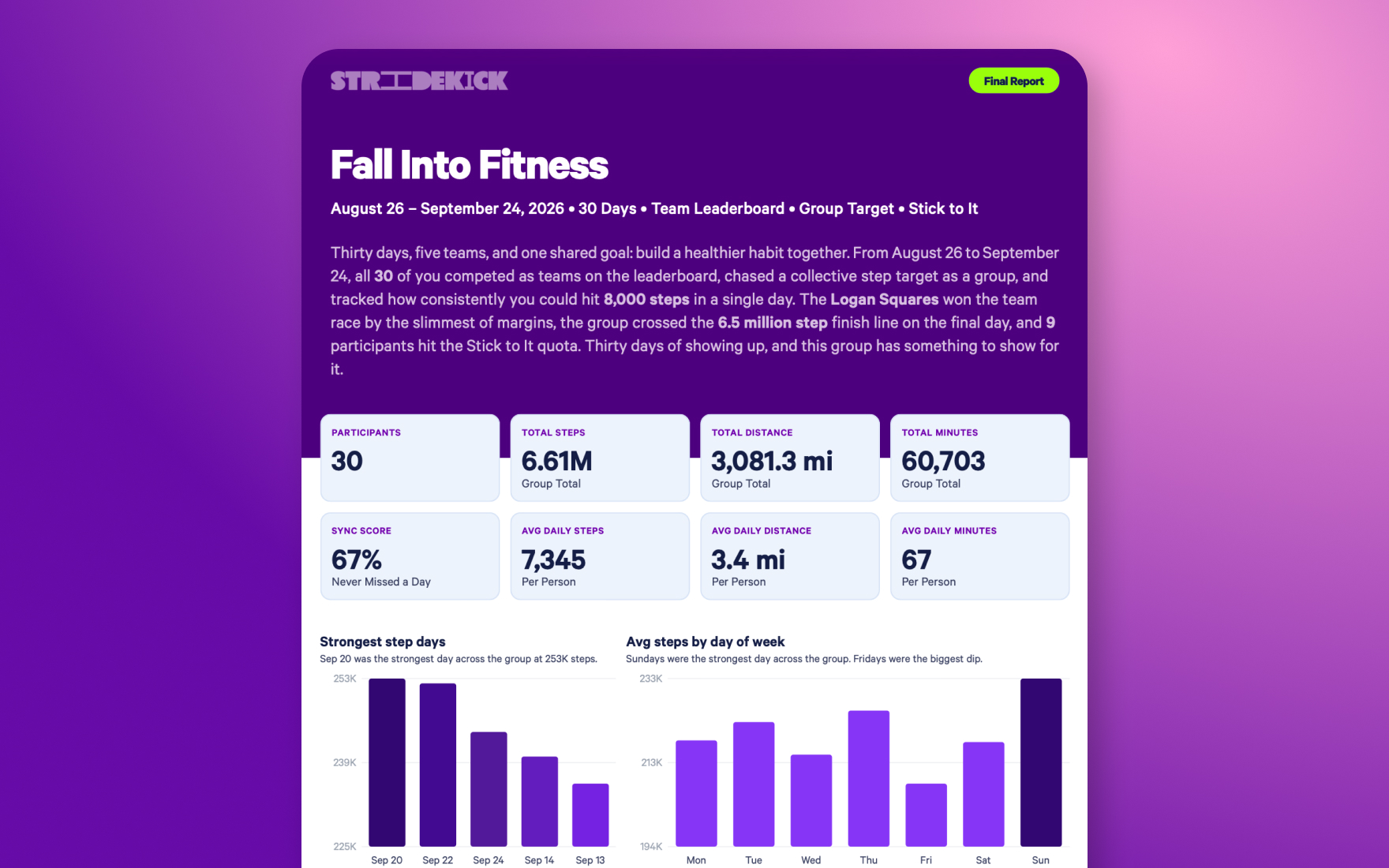
Everyone gets a moment, not just the podium
This is the part we care about most. Challenge Recap is built to find the wins a spreadsheet hides. Here's what that looks like in a sample recap:
- The most consistent person wasn't the fastest. One participant averaged 5,157 steps a day, about half the group average. They also logged activity on all 60 of 60 days, and the recap gave them the Most Consistent award for it.
- The biggest comeback came from outside the top 10. One participant went from 93 to 167 active minutes a day between their first and last week. An 80% jump, called out by name.
- A team won on commitment, not horsepower. Even though the Marketing Movers finished third, the recap made sure everyone knew they were the only team with a perfect sync score.
- The middle carried the group. The group goal breakdown highlights the majority of activity came from the 20 people outside the top 10 steppers. The recap celebrates the middle of the pack.
That last one matters. When your group sees that the middle of the pack moved the number, the middle of the pack comes back.

What's inside every recap
Every recap is built around the challenge you actually ran, including every mode from Leaderboard to Group Target. Here's what your group gets:
- A headline story written about your group, not a template with names swapped in.
- The big numbers: total steps, distance, active minutes, sync score, and daily averages per person.
- Individual awards like Most Consistent, Most Improved, Single Day Champ, Weekday Hustler, and Weekend Warrior.
- The close races. Lead changes, photo finishes, and days decided by a single active minute.
- Team moments, including a playful award for every team name, not just the winner.
- Honest goal tracking. Fell short of a group or race goal? The recap says so, credits the effort, and suggests a realistic target for next time.
- Next-challenge goals based on what your group actually did.
- "What This Challenge Proved": a short summary written for the person who approves your wellness budget.
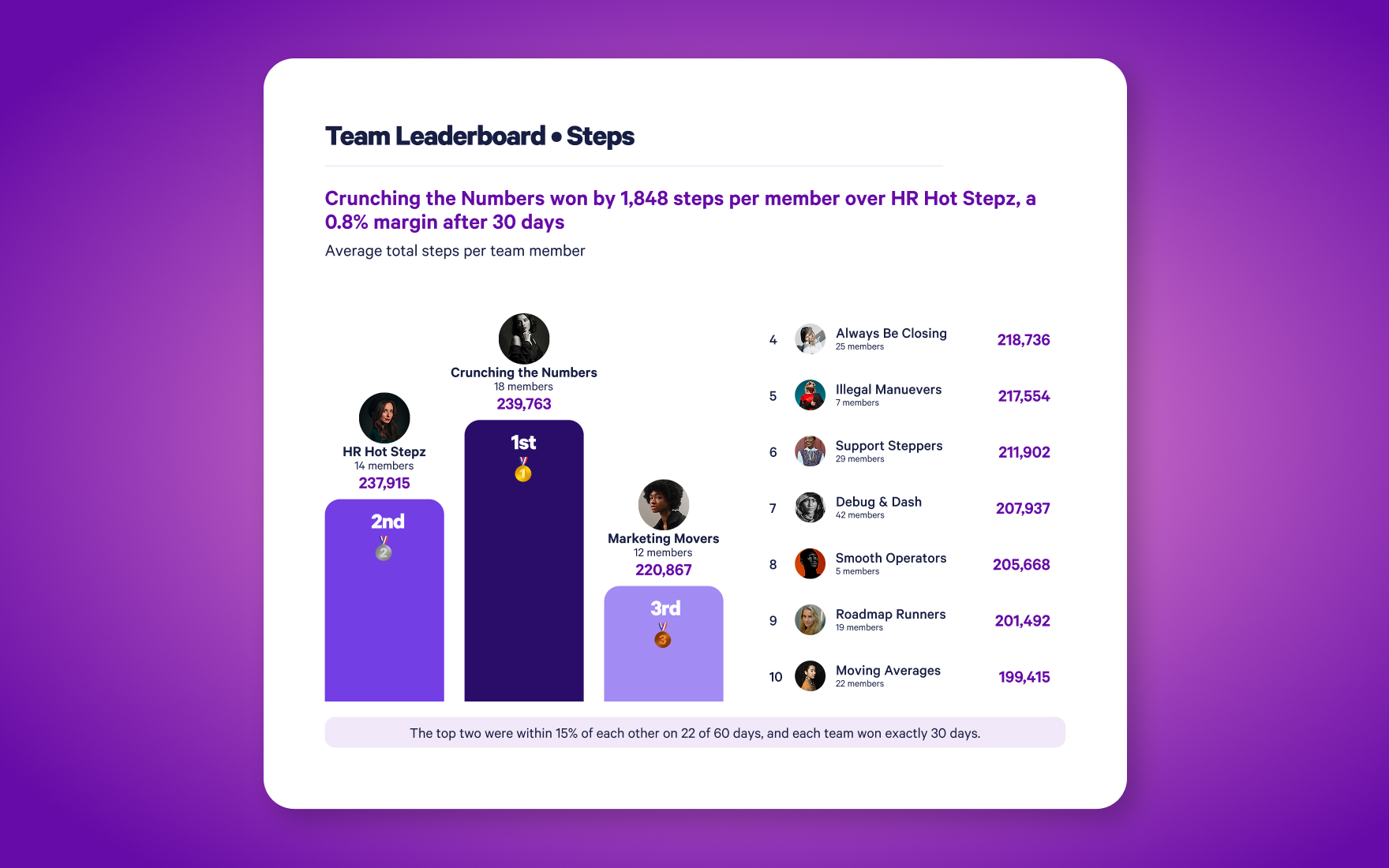
Pick the voice. We'll do the writing.
Your company has a personality, so your recap should too. Choose a tone before you generate: Motivating (the default), Comedic, Sports Announcer, Playful, Hardcore, or Professional.
Same stat, two very different vibes:
Motivating: Claire Rhodes showed up all 60 of 60 days. The real achievement isn't the number; it's the discipline to never miss.
Sports Announcer: SIXTY FOR SIXTY! Claire Rhodes does not take days off, folks, and the rest of the league has been put on notice!
Don't wait for the finish line
Challenge Recap works mid-challenge too. Run a Mid-Challenge Recap at the halfway point to show your group where the races stand, who's surging, and how close they are to the group goal. It's the easiest way to re-energize a challenge right when attention starts to dip.
How it works
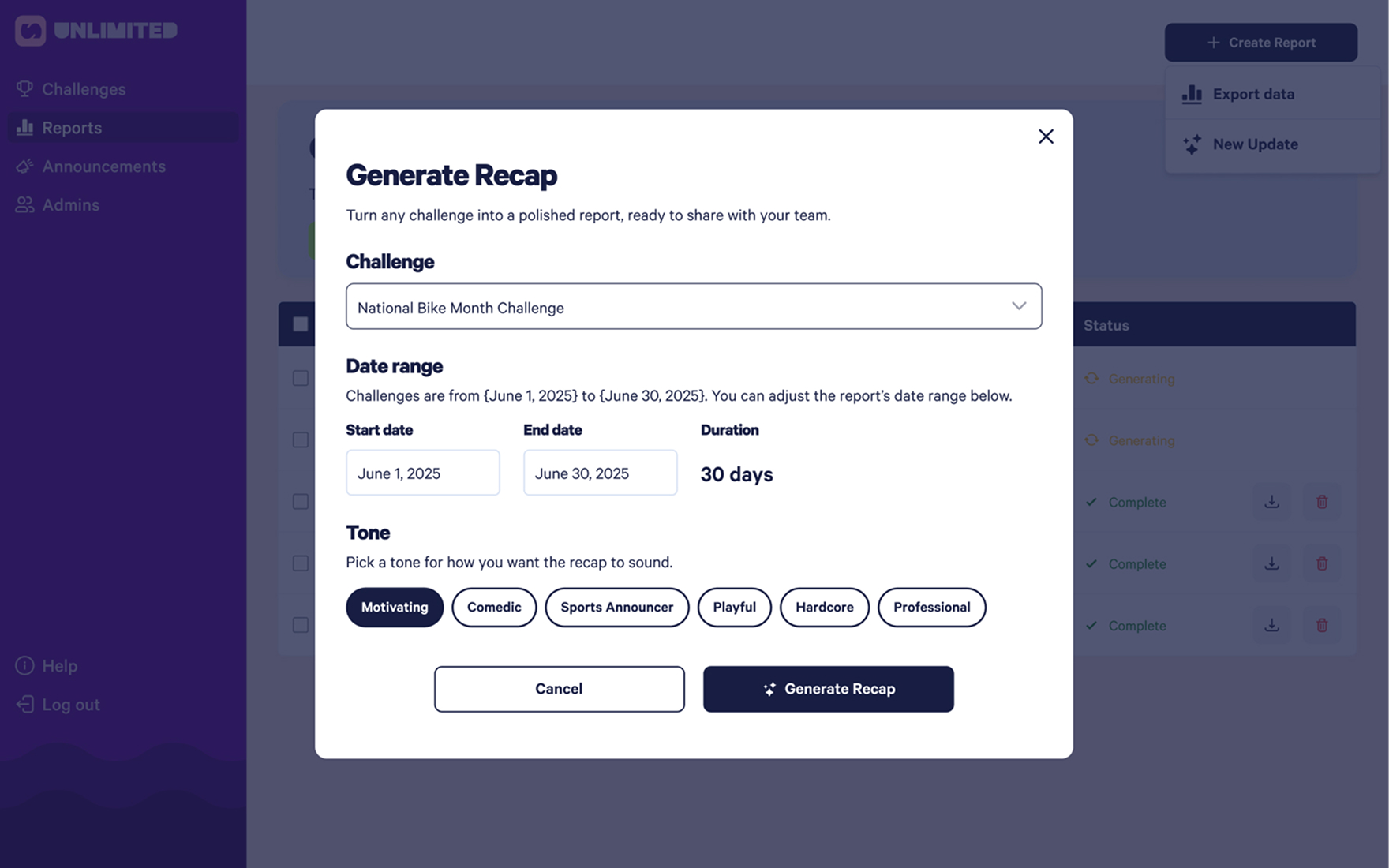
If you can pick a challenge from a dropdown, you can make a Challenge Recap.
- In SuperDash, click Generate Recap on any challenge, or go to Reports → + Create Report → Generate report.
- Confirm the challenge and date range, and pick your tone.
- Click Generate Recap. Your recap appears in the Reports table, ready to download and share.
That's the whole thing. The hardest part is deciding who to send it to first.
Your next recap writes itself
You already did the hard part: you got people moving. Challenge Recap makes sure they know it counted, every one of them.
Challenge Recap is available now in SuperDash. Head to your Reports page and click Generate Recap to get started, or ask your account manager to turn it on for your organization.
Pair it with Challenge Templates and multi-admins, and your whole program runs start to finish without the busywork: pick a challenge, let your admins run it, and send a recap everyone actually reads.
Got questions? Visit our Help Center or email support@stridekick.com.