

22 Step Challenge Chat Prompts to Keep Participants Engaged
Keep your step challenge going strong with 22 ready-to-use chat prompts for kickoff, mid-challenge motivation, friendly competition, and the finish line.
The first few days of a step challenge are full of energy. People join, the leaderboard starts moving, and someone has already posted a sunrise photo from their morning walk.
Challenge Chat is how you keep that feeling going all the way to the finish line. A well-timed question, photo prompt, team check-in, or bit of friendly competition gives participants another reason to open the app beyond checking their step total. It turns the challenge from something people are doing on their own into something they're doing together.
A prompt or two a week is plenty. We pulled together 22 ready-to-use step challenge chat prompts for every stage of a challenge, from kickoff through the final day. You'll also find ideas for keeping the conversation active, when to use an Announcement instead, and a communication rhythm you can use throughout your challenge.
What Is Stridekick Challenge Chat?
Challenge Chat is the group conversation inside every Stridekick challenge, on any plan. Participants are added automatically and can send messages and photos, react with emoji, and reply in threads.
Team Leaderboard and Team Virtual Race challenges also get Team Chat for each team. Admins post from the Stridekick app as a challenge participant, so join your own challenge before day one. Chat stays in everyone's inbox for 7 days after the challenge ends.
Challenge Chat vs. Announcements: When Should You Use Each?
Challenge Chat is the conversation, so use it when you want participants to reply, react, or share a photo. Announcements are the broadcast. Stridekick Unlimited admins send them from SuperDash, and they can be scheduled ahead of time, sent as push notifications, and paired with an image or a call-to-action button.
Our rule of thumb: Announcements are for things everyone needs to know. Challenge Chat is for things everyone wants to talk about.
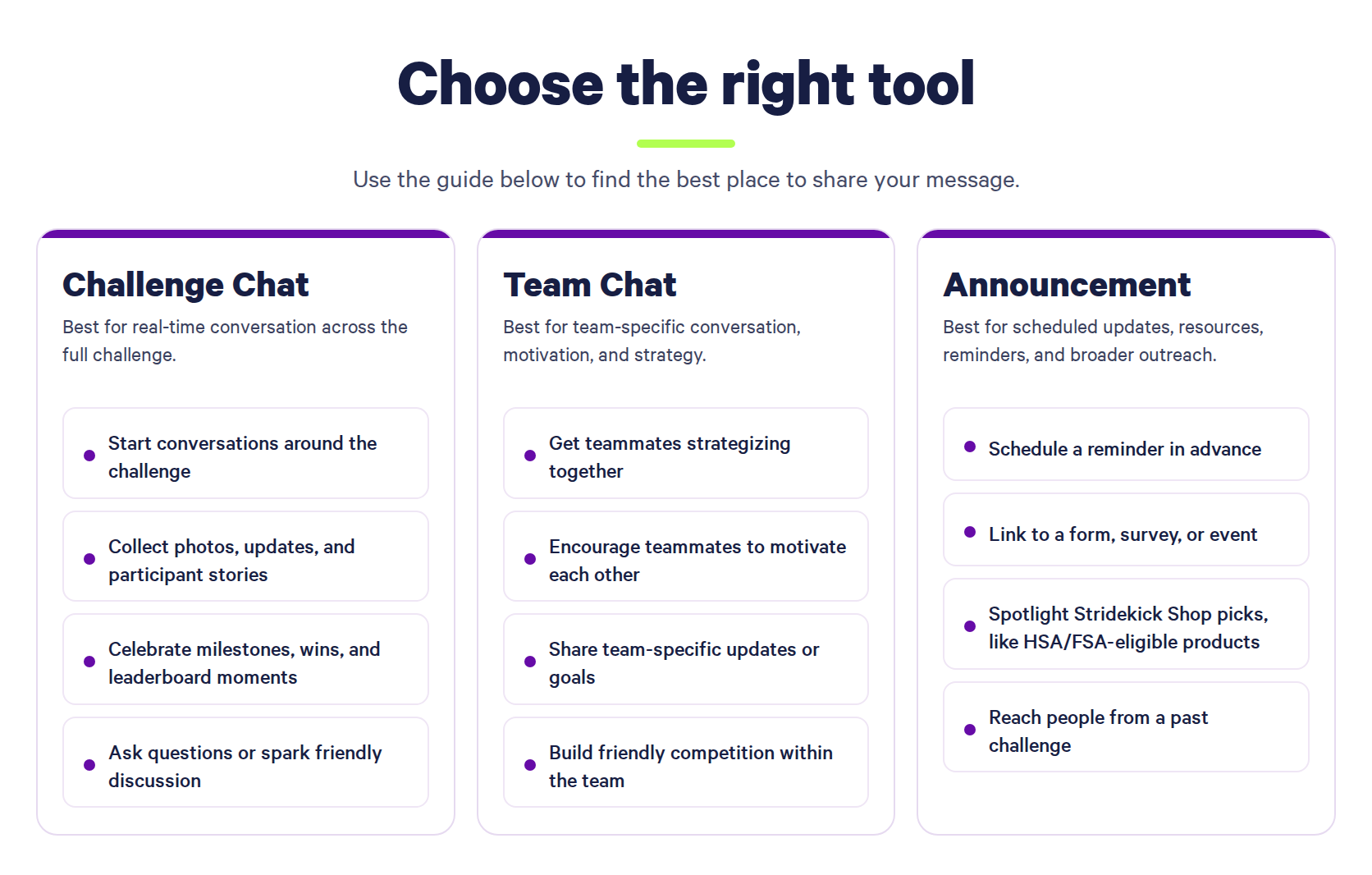
The two work best together. An Announcement makes sure everyone knows a bonus day is happening, and Challenge Chat is where the screenshots roll in. For more on the broadcast side, see our guide to boosting engagement with Stridekick Announcements.
22 Step Challenge Chat Prompts You Can Copy and Paste
We recommend starting with one or two prompts a week, plus a kickoff and a wrap-up. Swap in anything in [brackets] and post.
Step Challenge Kickoff Prompts
1. Welcome Everyone
We're officially off! 🎉 Welcome to [Challenge Name]. Say hi below and tell us where you're taking your first steps of the challenge today.
2. Share Your Goal
Before the steps start stacking up, what's your goal for this challenge? Finishing strong? Moving more consistently? Out-walking your dog? Tell us below so we can cheer you on.
A goal prompt lets every participant define their own version of a win. It also gives you something specific to celebrate later in the challenge.
3. Setup Check
Quick check before we get rolling: is your device connected and syncing with Stridekick? React to this message once you're all set.
For more ways to start strong, see 12 ways to launch your step challenge with a bang.
First-Week Step Challenge Chat Prompts
4. Day Three Check-In
Day 3! How are we feeling? React with the one that fits: 👟 cruising, 🔥 on a roll, 🐢 warming up.
5. Extra Steps Swap
How are you sneaking in extra steps this week? Morning walk, lunch lap, pacing on calls, post-dinner stroll? Share your go-to. Someone might steal it.
6. Streak Roll Call (Streak challenges)
Streak check! Who's hit [goal] every single day so far? What's keeping yours alive?
7. Stick To It Scorecard (Stick To It challenges)
Quick reminder: the goal is [goal] on [X] days during the challenge, and the days don't need to be in a row. How many have you checked off so far?
Mid-Challenge Chat Prompts
The midpoint is a great moment for a fresh prompt. Routines have settled in, and everyone has real progress to share.
8. Halfway High Five
We're halfway there! What's one thing you're proud of from the first half of [Challenge Name]?
Pride prompts give every participant a win to share, whether that's a new morning routine, a personal best, or a walk with the kids.
9. Group Progress Update (Group Target challenges)
Group update: together we've reached [X]% of our [total goal] goal! Every walk moves the whole group closer. Who's adding steps today?
10. Virtual Race Check-In (Virtual Race challenges)
Where is everyone on the route? Drop a screenshot of your spot on the map or tell us which milestone you're chasing next.
11. Team Huddle (Team Chat)
Team [Name], huddle up. We're [position/update] right now. Who's in for an extra 10-minute walk today?
Team Chat gives each team its own space for strategy and friendly rivalry. The main Challenge Chat stays open for the whole group.
Fun Step Challenge Engagement Ideas
12. Walk Pic Wednesday
Show us where you walked today! 📸 Trails, treadmills, parking lots, office hallways, and neighborhood laps all count.
13. Meet Your Walking Buddy
Who keeps you company out there? Dog? Kid? Coworker? A podcast host who has no idea you're best friends? Introduce your walking buddy.
14. Playlist Swap
What song gets you moving every single time? Drop one below. Bonus points if someone adds it to their next walk.
15. Hidden Gem
What have you discovered because you've been walking more? A trail, a coffee shop, a great view, a ridiculously photogenic mailbox? Tell us about it.
16. Treat Yourself
You've been putting in the work. If you could treat yourself to one thing after this challenge, what would it be? Recovery gear, a new yoga mat, something for your home gym? Check out Stridekick Shop for inspiration and drop your pick below.
The answers double as a wish list. Save them for prize ideas in your next challenge.
17. Bonus Day
Bonus day! Hit [X] steps today and post a screenshot of your daily total here by [time] tomorrow. Everyone who posts earns one raffle entry for [prize], drawn on [date].
Entries come from the screenshots in chat, so tally them by hand before the drawing. Pair the prompt with a scheduled Announcement so every participant sees it. For more ways to keep rewards fair, check out 12 ways to keep challenge prizes fun, fair, and cheat-proof.
Final-Week Step Challenge Chat Prompts
18. Final Countdown
[X] days left! What's your plan for finishing [Challenge Name] strong?
19. Shout-Out Thread
Let's make someone's day. Name someone in this challenge who kept you motivated and tell them why.
20. Last-Day Rally
Final day! Every step today still counts. Drop a photo from your last walk, workout, dance break, or hallway lap.
Step Challenge Wrap-Up Prompts
21. Finish Line
That's a wrap on [Challenge Name]! 🏁 Whatever your final number, you showed up. What's one thing you're proud of?
22. What's Next
One challenge down! Winners will be announced [where] on [date], and [Next Challenge Name] kicks off [date]. Who's in for round two?
Challenge Chat stays open for 7 days after the challenge ends, so this teaser has time to land with the people most likely to join again.
A 30-Day Step Challenge Communication Plan
Treat the 22 prompts as a menu rather than a checklist. For a month-long challenge, a plan like this keeps the conversation going without flooding anyone's phone:
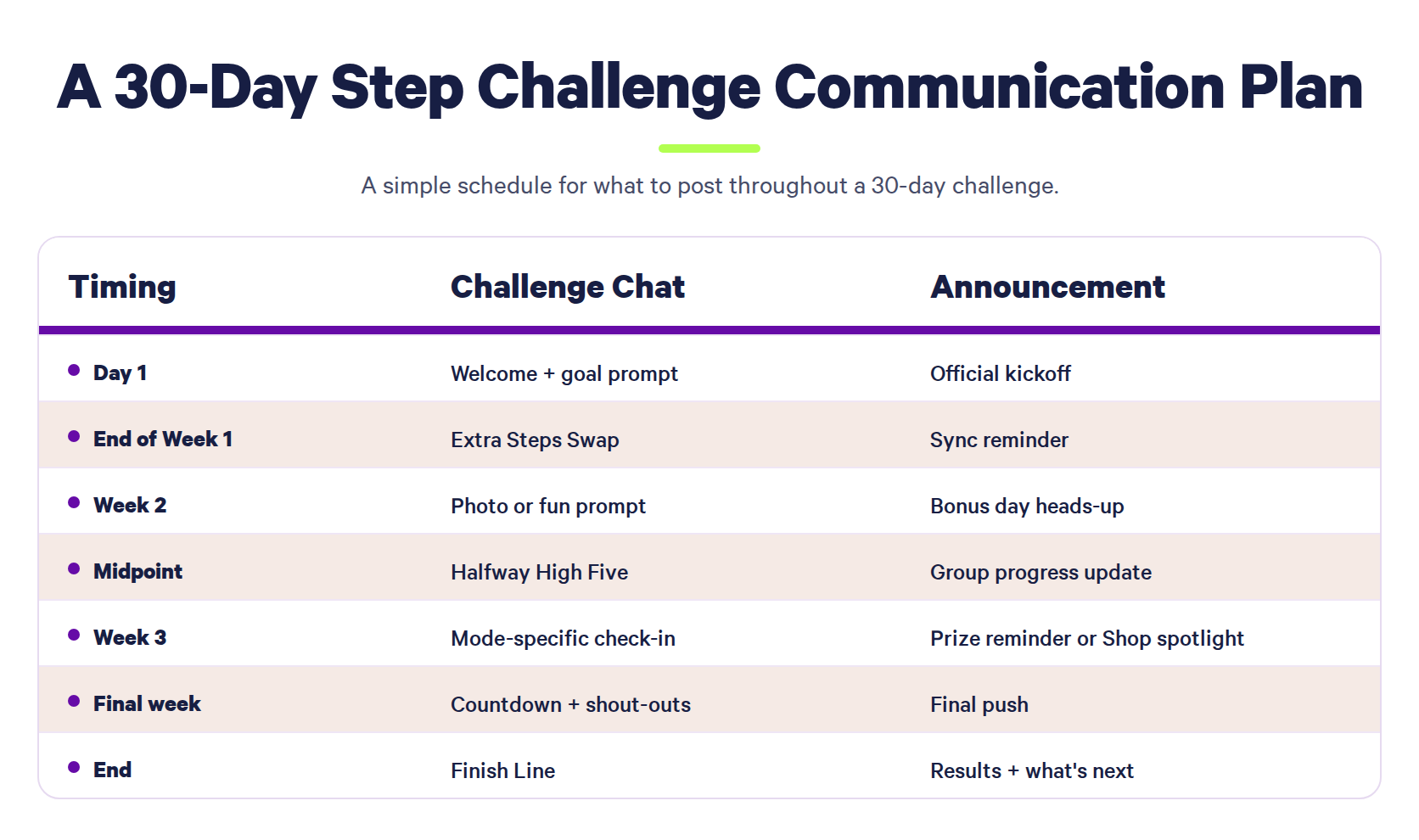
For a one-week challenge, three posts is plenty: a welcome on day one, one fun prompt midweek, and a finish-line post on the last day.
How to Keep Participants Engaged in Your Step Challenge Chat
- Answer your own prompt first. If you're asking for walking buddy photos, post yours before anyone else does. A thread with one reply already in it makes the next reply feel natural.
- Ask for five-second answers. One emoji, one photo, one song, or a quick reaction is easier to answer than a question that needs a paragraph.
- React to what people share. A reaction on someone's lunchtime walk tells them the group noticed, and it keeps them posting.
- Match prompts to your challenge mode. Group Target challenges invite progress updates, Streak challenges invite consistency check-ins, and Virtual Races come with built-in milestones. Our guide to Stridekick challenge modes breaks down what each one measures.
- Share the chat duty. With Stridekick Unlimited, you can also invite additional admins to help run challenges, so the person closest to each department or group can lead its conversation. For ideas on what those groups might run, see 10 ways teams across your company can use Stridekick.
- Recruit where your group already talks. Challenge Chat reaches people who have joined, while Slack, Teams, email, and your intranet reach everyone else. These 12 ways to boost engagement in your step challenge include copy you can share outside the app.
Step Challenge Chat FAQs
What should I post in a step challenge chat?
The best step challenge chat prompts are quick to answer. Photo prompts, progress check-ins, bonus days, playlist swaps, shout-outs, and questions about how people fit in their steps all work well in Stridekick Challenge Chat.
How often should I post in Challenge Chat?
We recommend one or two prompts per week, plus a kickoff message and a wrap-up. If participants are already chatting on their own, let them run with it.
Can admins post in Stridekick Challenge Chat?
Yes. Admins post from the Stridekick app as a participant in the challenge, so join your own challenge to start the conversation.
What's the difference between Challenge Chat and Stridekick Announcements?
Challenge Chat is a conversation where participants post messages and photos, reply, and react. Announcements are admin messages sent from SuperDash on Stridekick Unlimited, and they can be scheduled, sent as push notifications, and include an image and a call-to-action button.
How long does Stridekick Challenge Chat stay open?
Challenge Chat stays in each participant's inbox for 7 days after the challenge ends. That window works well for final photos, winner shout-outs, and a preview of the next challenge.
Turn Your Step Challenge Into Something People Talk About
Challenge Chat comes with every Stridekick challenge on every plan. It gives people another reason to check in beyond the leaderboard. A few prompts throughout the challenge can keep people sharing, cheering each other on, and coming back to see what everyone else is doing.
Running a challenge with friends, family, or a small group? Download Stridekick to start a Free challenge, or upgrade to Pro in the app for a private, longer challenge.
Running a program for your company or organization? Explore Stridekick Unlimited to give teams their own spaces to connect, schedule important updates with Announcements, and bring more admins in to help keep your program active.